

TrafficWave Generator 3.0 is a complete, cloud-based, AI-powered software platform designed to automate Pinterest marketing tasks. It helps users design and schedule image pins, video pins, write SEO-friendly titles and descriptions, and publish content automatically from standard URLs to generate organic traffic
How TrafficWave Generator 3.0 Generates Traffic
Automated Pin Creation: It designs image and engaging video pins using built-in pre-designed templates.
URL Campaigns: Converts website URLs, affiliate links, or blog posts into marketing campaigns.
AI Copywriting: Automatically write SEO-optimized pin titles and descriptions to improve impressions, engagement, and clicks.
Scheduling Tools: Automates pin scheduling and helps you queue content to publish regularly without manual work every day.
How Much Is TrafficWave Generator 3.0?
The TrafficWave Generator software costs $37 for the basic plan, and the Pro costs $47, which includes a commercial license and expanded templates.
No monthly subscription and no additional payment.
Money-backed Guarantee
The TrafficWave Generator 3.0 comes with a 30-day money-back guarantee.
What Are the TrafficWave Generator 3.0 Pros & Cons?
Pros:
- No monthly subscriptions.
- Easy-to-use interface.
- Automate scheduling
- Create image and video pins
Cons:
- Results are not instant.
- It requires time and patience to grow Pinterest organic traffic.
- Commercial rights may require Pro
My Verdict
TrafficWave Generator 3.0 is a useful tool for marketers, bloggers, and store owners looking to take advantage of Pinterest traffic to grow their business.
While the Pinterest traffic may not replace SEO or content marketing, the software effectively eliminates the stress and time for pin creation and scheduling
If you plan to use Pinterest to grow your business and generate thousands of leads, the Traffic Wave Generator 3.0 may be the best option. You can start using TrafficWave Generator 3.0 today to grow your business.
Pinterest is one of the most underrated traffic sources for bloggers, affiliate marketers, store owners, and online businesses.
Unlike other social media posts that disappear within a few hours, Pinterest pins can generate traffic for months or even years.
Designing and creating eye-catching pins, writing optimized pin descriptions, and publishing content consistently is game change to generate thousands of visitors every month.
But these can be time-consuming. And this is where you need TrafficWave Generator 3.0.
Traffic Wave Generator 3.0 is the latest AI-powered Pinterest marketing tool created to help users design eye-catching image pins and video pins, write optimized pin titles, descriptions, and complete Pinterest campaigns with just a click.
The software has the capabilities to automate most of the Pinterest marketing tasks, making it easier to attract targeted visitors without spending hours creating and scheduling pins manually.
Does TrafficWave Generator 3.0 actually give results?
In this TrafficWave Generator 3.0 review, I’ll talk about its features, pricing, benefits, pros and cons, and compare it with other Pinterest marketing tools.
I’ll also give a veridic if the TrafficWave Generator software is best and whether it can help you attract more traffic from Pinterest.
TrafficWave Generator 3.0 at a Glance
| Feature | Details |
| Product Name | TrafficWave Generator 3.0 |
| Category | Pinterest Marketing Software |
| Technology | AI-Powered |
| Best For | Bloggers, Marketers, store owners,, etc. |
| Main Function | Create and Schedule Pinterest Pins |
| Pin Types | Image Pins & Video Pins |
| Official Website | Check the official website here. |
What Is TrafficWave Generator 3.0?

TrafficWave Generator 3.0 is a comprehensive AI-powered Pinterest marketing software designed specifically for Pinterest users to create, optimize, and schedule pins automatically.
It can generate AI images, create video pins, write SEO-friendly titles, and automate publishing to help small businesses and and affiliate marketers drive targeted traffic from Pinterest without the need for manual tasks.
According to the creator, the TrafficWave Generator 3.0 is the world’s first 1-click Pinterest traffic machine that is capable of transforming any URLs or keywords into stunning Pinterest image and video pins, then publishing them automatically to generate unlimited traffic to your website ot offers.
With this Pinterest tool, users don’t need a camera; no design skills or experience are required.
The best part, it works with any niche or industry.
Create videos and image pins; automatically publish them 24/7. .
Another benefit of the tool is that it has a built-in AI copywriter for titles and descriptions and identifying keywords.
What Does TrafficWave Generator 3.0 Do?
TrafficWave Generator 3.0 is an all-in-one solution for anyone looking for an easy way to automate their Pinterest marketing efforts and generate consistent traffic without spending hours designing pins manually.
How Does TrafficWave Generator 3.0 Work?
The TrafficWave Generator 3.0 works in four steps:
Step 1: Add a URL OR keyword into the tool.
The first step is to add a URL or keywords to create a pin. The URL can be an affiliate link, a blog post, a product page, or a YouTube video.
And if it’s a keyword, just type it.
That is your starting point, then wait for the tool to do the magic.
Step 2: TrafficWave AI creates everything automatically
The AI tool generates images and videos and writes well-optimized titles and keyword-rich descriptions.
As Pinterest is favoring video pins, you can use the tool to create more video pins that can go viral in a matter of time.
I spend hours creating my Pinterest pins, and it has taken much of my time.
Using TrafficWaves to design pins reduces the time spent on manual work.
Step 3: Schedule & publish Pins Autopilot
One of the best features of TrafficWaves is scheduling. You can schedule your pins for up to 30 days.
This means you can publish your pins at any time, when you’re on holiday or at your daily job, and start getting traffic. It only takes less than 5 minutes per day to design and publish your pins.
Step 4: Start Getting Traffic Every Day
After publishing, each pin will get indexed and start getting impressions and engagement.
Then, in a few days, you can expect to start getting traffic for months.
Unlike other social posts that disappear in 48 to72 hours,, well-optimized pins keep working for months after pinning. The more you publish, the more your traffic compounds.
How to Use TrafficWave Generator 3.0 to Grow Your Traffic
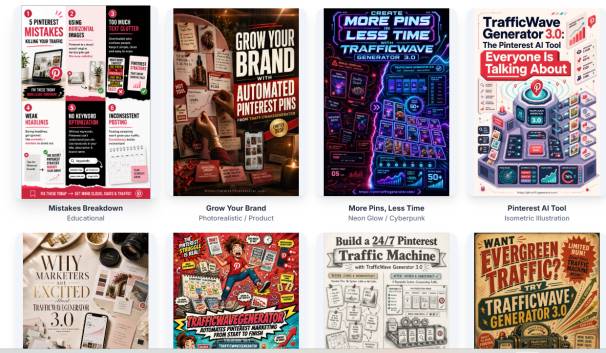
AI Pin Image Generator
Creating pin images manually is time-consuming and requires more effort.
TrafficWave Generator 3.0 comes with pre-designed pin templates you can easily edit and rebrand to design pins quickly.
Benefits
- Design pins faster
- Templates are easy to rebrand
- Design stunning images
- Fewer design works
AI Pin Video Generator
Pinterest favors video pins, and they also get higher engagement.
The tool helps you create video pins from your ideas at no extra cost.
No skills required, no extra tools, and the software can automate the process.
Benefits
- Getting higher engagement
- More visibility
- More clicks
Video Pin Creator & Publisher
Auto-generate HD video pins and publish them automatically.
This reduces the manual work of publishing pins that can take more time.
Benefits
- Publish video pins 24/7
- Auto-generate video pins
- Get more people to view your pins
- Make Pinterest promote your videos
Advanced Scheduling
Scheduling pins is one of the most difficult tasks when it comes to Pinterest marketing.
With this software, you can schedule your pins for 30-days in less than 10 minutes.
No more spending hours scheduling pins. Making it easy to post your pins at optimal times automatically to get more impressions and engagement.
Benefits
- Streamline workflow
- Save time
- Publishing regularly
- Publish in advance
Convert Smart URL-to-Pins
Design pins from any URLs. It may be a blog post, your affiliate links, YouTube videos,, etc.
The tool generates pins for your YouTube videos with matched images.
Benefits
- Easy to create pins for any form of content
- Works perfectly for affiliates
- Help promote offers directly on Pinterest.
- No more copyright images for pins
- Create multiple pins with a click
Write optimized titles and descriptions.
TrafficWaves software saves your time; no more guesswork—write titles that get saves and clicks.
Users can use the built-in AI to write well- Optimize titles and descriptions
Managing Your Pinterest Campaign
Users can easily manage and organize their campaign from a single dashboard.
Identify winning campaigns, remove underperformers, and scale with ease.
Benefits
- Tracking your results
- Manage all your campaigns
- Better workflow
Access to Analytics & Reporting
One way to see if your Pinterest pins are performing is to get access to the report.
You can track your impressions, saves, and clicks and identify winning pins.
You will know which boards and pins drive more clicks.
- See pin performance
- Engagement metrics
- Campaign performances
- And more
Manage Multiple Accounts From Single Dashboard
The pro version allows users to manage multiple accounts from one dashboard.
This is best if you run multiple accounts in different niches.
Best for:
- Agencies
- Niche site owners
- Affiliate marketers
The TrafficWaves Generator gives you everything you need to grow your business using one platform—Pinterest.
TrafficWave Generator 3.0 Pricing
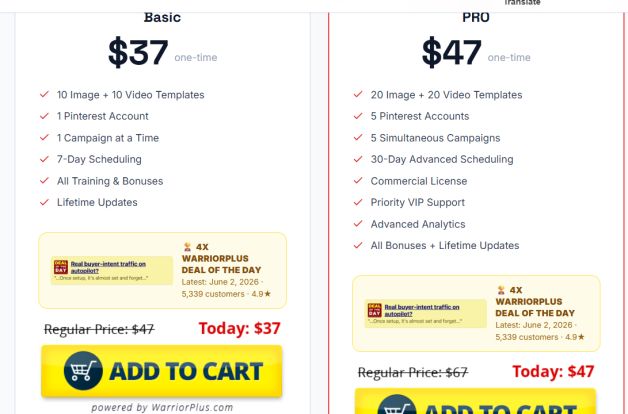
Before you take action, you need to know how much the TrafficWave Generator 3.0 costs.
Here are the details:
TrafficWave Generator 3.0 has two payment plans:
Basic Version: $37 (One-time Payment)
The basic plan includes:
- 10 Image templates
- 10 Video Templates
- 1 Pinterest Account
- 1 Campaign at a Time
- 7-Day pins Scheduling
- Access to free Training
- Bonuses
- Lifetime Updates
The Pro version cost $47 One-time payment
The pros includes:
- 20 Image templates
- 20 Video Templates
- 5 Pinterest Accounts
- 5 Campaigns at a time
- 30-Day pins Scheduling
- Access to Commercial License
- VIP Support
- Advanced Analytics
- Access to all bonuses
- Lifetime Update
The TrafficWave Generator Pro version offers more features than the basic plan for a small additional investment.
Comparing Pinterest Manual Pining Vs TrafficWave Generator 3.0
Let’s compare pining manually with the TrafficWave Generator automated tool
Pin design and creation
Manual waste time and slow down
TrafficWave Generator is faster
Video pin creation
Manual design may require an external tool
TrafficWave Generator is easy with a click
Pins scheduling
Scheduling manually takes more time, and with TrafficWave, it can be automated.
Pinterest Account Management
Managing multiple accounts manually requires extra work, but with this tool, users can run multiple accounts from a single dashboard.
Who Is TrafficWave Generator 3.0 Best For?
The TrafficWave Generator 3.0 is best for users who want to grow their business using Pinterest but don’t want manual strategies due to its time consuming on content creation.
The software is useful and best for affiliate marketers, bloggers, store owners, and small businesses who are looking beyond search engine traffic and relying on Pinterest organic traffic.
The tool works for beginners who want to tap into social media traffic, mainly Pinterest, but want to remove all the complexity in designing pins and manual scheduling to simplify their workflow.
For agencies managing multiple Pinterest accounts, looking for automated tools to reduce time-consuming tasks and increase their productivity.
Who Should Avoid TrafficWave Generator 3.0?
This Pinterest automation tool may not fit for everyone.
If you’re looking for instant traffic from Pinterest overnight, it may not work for you.
Users not willing to learn about Pinterest strategies and how its algorithm works. Even with this tool, you still need to learn how Pinterest can work for your business.
If you’re expecting to generate income without proper marketing strategies, you may be disappointed.
If you want instant results, then go for Pinterest ads, but you need to be ready to invest your money.
What Are the TrafficWave Generator 3.0 Pros and Cons?
There are many advantages of using the tool, but it still has a few drawbacks that you may need to know before investing your money.
Pros
- Low price tag
- No monthly subscription
- Beginner-friendly
- AI-powered content creation
- Automate scheduling
- Access to update
- Run multiple accounts
- Video pin support
- Access to commercial rights
Cons
- It takes time
- No guarantee of results
- Requires posting content regularly
- Limited customization
- Pinterest’s algorithm can change anytime
Can TrafficWave Generator 3.0 Really Generate Traffic?
Yes, the tool can generate consistent traffic if users make use of it effectively.
The results depend on the users, not the tool itself.
Pinterest is a search engine, and by design, turning pins, writing well-optimized titles and descriptions, your pins can show up when users search for information based on your keywords.
Aside from designing attractive pins, consistency is the key. You need to post regularly; thanks to the tool, you can schedule pins for 30 days.
You can start with 5 pins per day, and after two weeks, you can increase it to 10 or 15 pins per day, and so on.
Over time, your traffic will begin to compound. The more you create quality content, the more you pin, and the more traffic you can attract to your website.
But the downside is that TrafficoWaves 3.0 can’t guarantee visitors or sales. You need to make it work.
TrafficWave Generator 3.0 Review: Final Verdict:
If you’re looking for the best tool to automate Pinterest marketing, then get the TrafficWave Generator software.
It is still among the best automation software for business owners who want to generate traffic and grow their brand using Pinterest marketing.
With TrafficWave Pinterest Software, you can design image pins and video pins, create more content, automate scheduling, and post automatically without manual work.
It simplifies your workflow and makes your Pinterest marketing strategy easy, increasing the chances of getting results faster.
Importantly, with no monthly subscription, the TrafficWave is a one-time investment, making it available for everyone.
If you’re looking for instant results, overnight sales, the software may disappoint you.
It can’t work alone to get you traffic and sales. The results depend on how you use it to your advantage.
Overall Rating
My overall rating for the TrafficWave Generator 3.0 is 4.5 out of 5 stars.
Frequently Asked Questions
Is TrafficWave Generator 3.0 Legit?
TrafficWave Generator 3.0 is an AI software designed to automate Pinterest traffic generation. it helps users to turn URL into image and video pins, write SEO-friendly title, descriptions and schedule campaigns.
Prices start from $37 one-time payment; it is an affordable automated tool for driving organic traffic without monthly fees.
Is TrafficWave Generator 3.0 a Scam?
No, it’s not a scam. Many users shared their results using the tool to generate traffic and grow their brand.
How Much Does TrafficWave Generator 3.0 Cost?
TrafficWave Generator 3.0 has two plans: the basic costs $37, and the Pro costs $47 one-time payment.
Can Beginners Use TrafficWave Generator 3.0?
It is best for both beginners and those with experience in Pinterest marketing to automate most of the tasks. No more manual pinning; the tool auto-generates pins and posts them automatically.
Can I use TrafficWave Generator for affiliate marketing?
Yes, it is the best Pinterest automation software for affiliate marketers to turn their affiliate links into image and video pins and post them on Pinterest to drive targeted traffic to offers.
Is TrafficWave Generator better than Tailwind?
Yes, better than Tailwind, as it creates and designs pins and publishes them; it saves time and effort when schedule pins.
You can learn more on how to generate traffic to your website with minimum effort. My simple steps to drive organic traffic using CTR magnetic methods can grow your traffic to your brand or products and services.
