

The days of Shopify 14-days or 30-day has are gone. In 2026, Shopify moved to a new revenue model.
New users get 3 days free, followed by 3 months for $1 per month.
This is the best deal in the history of Shopify deals, but if you’re not prepared, the 72 hours will vanish before you even upload your store theme.
Whether you’re launching your first store or want to migrate to the Shopify platform, the 3-month for $3 offer is an opportunity to start your store with no upfront cost.
In this updated guide, I’m revealing how to claim the $1 Shopify promotion and 72-hour checklists to get your store live and running
The Shopify 90-day free trial is a great place to start and explore all its features.
What Is Shopify Free Trial?
Shopify’s free Trial offers users a unique opportunity to test its powerful e-commerce platform for free. It is a great way for beginners and startups to test out all the Shopify Features before investing in the paid plan.
During the free Trial, you can create online stores to sell physical and digital products.
During the Shopify free trial, users can:
- Create an online store
- Customise their store with themes
- Add products
- Set up payment for customers to make a purchase
- Access to the marketing tools
- And more
How Shopify’s Free Trial Works
Create Account: To start, a new user must sign up for Shopify through a free trial. It requires basic information such an email address.
Choose a Store Name: Shopify will ask for your store name. You can change it later, but just pick a name.
Launch your store: Launch your online store.
Shopify Trial Duration
The trial period allows new users to set up accounts and access all Shopify features.
Shopify offers trials, and here is the summary.
- Shopify 3-day free trial
- Shopify 3 months for $1
After three days, you can extend the trial for 3 months and only pay one dollar per month.
Live Workshop: How His Students Made Over $400M In Affiliate Commission
The Shopify trial is good for anyone who wants to see if the platform has all the e-commerce features and integrations to build and scale their business.
Shopify 3 Months Free Trial: Exclusive 90 Days Offer
New customers can start a 3-day free trial on Shopify without a credit card. After the trial ends, you can select any pay plan and extend the access for just $1 per month for the next 3 months.
To activate the extended trial, you need to pay by credit card or PayPal.
This exclusive offer is a great deal for anyone who wants to start a Shopify dropshipping business and test all the Shopify features.
Start a Shopify 90-Day Free Trial and start building your dropshipping business.
How To Sign Up For Shopify Free Trial In 2026
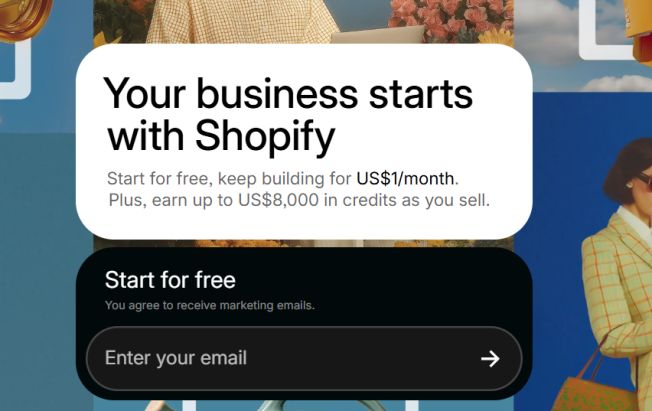
Signing up for the Shopify free trial is simple. It will give you access to the platform, which allows you to build an online store in a few minutes.
Step 1: Go to the Shopify free Trial page
On the Shopify official website, enter your email address to create an account. Shopify will send a confirmation link to the address, so make sure it is a valid email.
Step 2: Add your Password
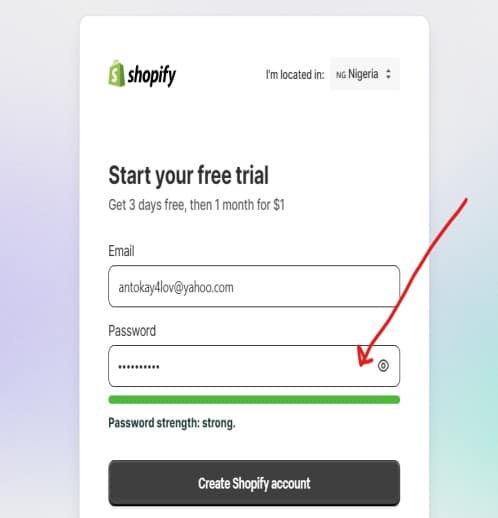
The next step is to add your password to your account.
Step 3: Decide where to sell your products

There are many options, so select the one that fits your business, like an online store, online marketplace etc
Step 4: Choose what product you want to sell.

It can be digital or physical products. For example, you can sell digital products such as eBooks, checklists, templates, etc
Step 5: Select your business location:
This is crucial; you must choose your business’s location or where you register it.
Step 5: Choose Your Plan

It is essential to choose your plan. If you’re a beginner or a startup, choose a basic plan. This feature is enough to start your Shopify dropshipping or sell digital products.
Step 6: Add your payment information

If you want to upgrade before the free trial ends, you must add your credit card. You will not be charged until the end of the free trial.
Step 7: Start your free Trial
When you click “subscribe to one dollar,” you will be taken to the Shopify Dashboard. From there, you can continue designing your store.
Is Shopify’s 90-day Free Trial Still Available?
The Shopify 90-day free trial is still available for new users. In 2024, Shopify stopped the offer for 9 months and reduced it to 30 days before reactivating it in October 2024.
Now, the Shopify 3 months are still available for $1 per month.
What Is a Shopify 120-Day Free Trial?
The Shopify 120-day free trial is an extended trial period for Black-owned businesses as part of the Shopify 1MBB.
1MBB mean 1 million Black Businesses Initiative.
It allows these businesses to use the platform for 120 days without incurring any subscription fees.
Along with these offers, you will also receive free training, mentorship, and a marketing tutorial to help you grow and scale your e-commerce business.
Shopify Free Trial History.
Let’s take a look at some of the free trials offered by Shopify within a year.
Shopify 14-Day Free Trial
Shopify offered a 14-day free trial over the years to help new users test the platform. It started from 2018 to 2022, and it has helped countless people to get started.
Shopify 30 Days Free Trial
The Shopify 30-day free trial is no longer available. It started in 2019, and it has been replaced with a 3-day free trial.
And now, Shopify has extended the trial period to 3 months for one dollar.
You can take advantage of the Shopify 3 months for $1/month.
Shopify 3 Months Trial
Shopify offers a 3-month trial after the 14-day trial ends.
The latest standard Shopify trial is now a 3-day free trial, which can be extended to 3 months for $1 per month.
New Shopify users can now use the platform for 93 days for just $3.
Shopify Free Trial Features
Now that you know how to get Shopify’s 90-day free trial, let’s look at it features.
The Shopify 90-day trial features include product management, payment integration, shipping set-up, the Shopify App Store and website builder.
Below is a quick breakdown of the features available during the Shopify 90-day trial.
Store Setup:

Access to the Shopify dashboard and website builder to design, customise and layout your store.
Product Management:

Add and manage products including description, pricing and inventory.
Shipping and Payment:
Integrate payment processors and set shipping rates.
Marketing Tools:
Access to the Shopify marketing features for store promotion.
Access to App Store:

Explore the Shopify App Store to grow your e-commerce business. Not all the apps are free; some are paid, but worth the cost.
Basic Analytics
The basic analytics allow you to track your store’s performance. With this feature, you track sales, orders, refunds etc.
SEO Features:
SEO is very crucial to your store’s visibility. The platform offers SEO tools to optimise your store and drive traffic from search engines.
Support:
The support is limited compared to the paid plans. You will get access to resources to guide you.
What Happened After the Shopify Free Trial?
After the 3-day subscription ends and you have not added your payment details, your Shopify account will stop working.
But don’t worry, your store won’t be deleted. You will be able to log in to your store for a few days.
During this time, you will be receiving an email to add payment to your store and pay $1 per month for 3 months.
Shopify Available Plans After Free Trial
Shopify’s free trial allows newcomers to explore the platform and its features before purchasing a plan.
Below is an overview of the trial period and the plans for upgrading.
How Long is The Shopify Trial?
The Shopify trial is three days without a credit card. After three days, you can continue for three months for one dollar.
After a 3-day trial
You pay $1 for three months and then upgrade to the regular plan to keep your store and continue using the platform.
That means you can use Shopify for 90 days and pay only $3, which is $1 per month.
Shopify three months free trial with all premium features for new users to test the platform if it is worth paying for or not.
Shopify Pricing Plan Overview
After the Shopify trial, you can choose three pricing plans based on your business needs.
Basic plan: $27 per month
The basic plan is suitable for a new e-commerce business just starting.
Feature: It includes all the features to start an online store, such as unlimited products, basic reporting,23/7 customer support, etc
Grow Plan: $72 per month
The Shopify plan is good for an experienced e-commerce business looking for advanced features such as
Advanced Plan: $399 per month
This plan is for experienced sellers who want to scale their e-commerce business.
Plus plan: $2300 per month
The Plus plan is the most expensive, and it is used by companies and e-commerce experts who sell millions per month.
Choosing The Right Plan After the Trial Ends
To choose the right plan for your business, you must consider the size, budget, and features you need to scale.
If you’re a beginner or a startup, I advise starting with the Basic plan. Those with experience and a fast-growing store can choose Shopify or the Advanced plan.
Shopify offers flexible plans, allowing for upgrading to any plan without any issues.
What Are The Benefits of a Shopify Free Trial?
The Shopify free trial goes beyond text, running the platform. It provides valuable resources and features for startups to explore Shopify features before making decisions.
Test Shopify Features For Free
With the Trial and 1 dollar for 3 months, users can explore all the features without payment. It helps in determining if Shopify is the right platform.
The Trial provides access to all Shopify tools for launching an online store, from creating a store to adding products.
Familiar with the Shopify Interface
Shopify has a friendly user interface and a very easy-to-use dashboard, which simplifies store management.
The free Trial helps you familiarise yourself with its interface for managing store design, product listing, and order processing.
Customise the store with a theme and templates.
During the Trial, you can design your store using free or premium themes. You can also experiment with layout, colour, font, and brand identity.
Understand Shopify Marketing and SEO tools.
The Shopify marketing and SEO tools can help to improve store visibility on search engines. Understanding Shopify marketing will help you promote your store and increase sales.
Others are:
- Experiment with payment gateways
- Explore Shopify apps and add-ons
- Understand Shopify analytics to help track your traffic and sales
When taking advantage of the Shopify Trial, you can test Shopify features and build a functional store before transitioning to a paid plan.
The trial period is essential for setting a foundation and refining your store set-up.
Features To Test During Shopify Free Trial
Since Shopify give access to most of its features, below are some key features to test during the trial period.
- Store design and customisation
- Product listening
- Payment gateways
- Checkout options
- Marketing tools
- SEO
- Reporting and analytics
- Shipping and Tax settings
- Shopify Apps
- Customer support
Anyone who joins a free trial will get full access to all the Shopify features.
How to Get the Most out of Shopify Free Trial
It is crucial to use the trial period effectively.
Identify Your Store Niche and Audience
Use the trial period to find your store niche and target audience. This will help you decide on store design, product selection, and marketing strategies to grow your online store.
Set Up Store Identity
Choose colours, fonts, and images that reflect your brand identity. They must appeal to your target audience.
Test payment and Shipping Options
Integrate your payment gateway and test the checkout options for a smooth payment experience. Also, check tax calculations and shipping rates for the target regions.
Test Shopify Apps
Install a few apps to automate most of the tasks, such as an app for customer reviews, email marketing, etc. and see how they work. You can choose from free or paid to enhance your online store.
Understand customer behaviours using Analytics.
Shopify analytics is a great tool to understand how visitors interact with your store.
Develop a plan to launch after the Trial ends.
When approaching the trial period, create a plan to launch your store, and choose a plan that best fits your business.
The above steps will help you set up a store ready to launch before the trial ends. With the above strategies, you will avoid rushing when switching to a paid plan.
72-Hour Shopify Checklist For Free Trial
Day 1: The Foundation
Shopify Setup: Create an account with your email. Answer the onboarding questions or skip for later.
Build Your Brand: Add your store name and a professional-looking logo.
Add Custom Domain: Connect a custom domain. Don’t use myshopify.com URL.
Create Your Legal Pages: Shopify has templates to generate your Privacy Policy, Terms of Service, and Refund Policy.
These pages are crucial and required to build trust.
Day 2: Your Storefront
Pick a Theme: Choose from the Shopify free Store 2.0 theme, like Dawn. It’s optimised for speed and works better for layout.
Product Upload: Add your first 2–3 products.
Write product descriptions. You can use Shopify’s AI assistant to write a well-optimised product description.
Set up your Store Header, such as about, contact, footer, etc.
Set up your Shopify Shipping and Taxes, such as free shipping, etc
Day 3: The Launchpad
Activate Shopify Payments.
You can use Shopify Payments, which can earn you 1% back in Shopify Credits to offset your subscription costs.
Pick a plan; choose the $1/month Basic plan so that you can “Disable Password” and go live.
Test Your Order: Make sure to test the order.
Is the Shopify 90-day free trial still available?
In 2026, Shopify Gas replaced the 90-day free trial with a 3-day free + 3 months for $1 offer, which gives you 93 days of access to all features for just $3.
FAQ About Shopify Free Trial
Can I Extend the Shopify Free Trial?
You can extend the free Trial. After the 3-day free Trial, Shopify offers three months for $1.That means you will pay $1 per month for three months.
This will give you time to launch your store and generate income to continue with the regular plan after three months.
Do I need a Credit Card to Sign Up For the Trial?
No, Shopify doesn’t require you to enter your credit card during the sign-up. You only enter the payment details in case you want to upgrade before the trial ends.
Will Shopify delete my store after the Free Trial ends?
Your store will remain, but you may not be able to access it until you upgrade to a paid plan.
Shopify will save all the settings and store customisation so you can continue when upgrading.
Can I use a custom domain during the free Trial?
Yes, you can add a custom domain for your store. During the Shopify free trial, you can access all the features with no limitations.
The only thing is that you need to purchase your domain separately through Shopify or another domain registrar.
Tips to Upgrade From Free Trial To Paid Plan
Here are a few tips for upgrading your account from a free to a paid plan.
Understand Your Business Need
Before deciding on the plan, consider factors such as the number of products, sales volume, and other features.
Each Shopify plan has its unique features to support your business.
Choose the right plan based on goals and budget
The two main factors to consider are your business’s budget and goals.
The Basic plan suits beginners, while the Shopify and Advanced plans are good for higher sales volume and store growth.
Review Shopify Billing and payment terms
You may want to familiarise yourself with Shopify’s billing cycle and how it works. You can pay monthly or annually.
You can save more if you choose annual billing. This will help to manage your budget effectively.
Make use of Shopify resources and support.
One thing I like about the Shopify eCommerce platform is that it provides many resources to help both beginners and experienced users understand how it works.
You can check their knowledge base, tutorial sections, and forum to get answers to your questions.
Is Shopify Worth It After the Free Trial?
After utilising the Shopify free trial, you might wonder if the e-commerce giant is worth the money.
Let’s look at some pros of choosing Shopify
- Easy to use and a friendly interface
- Advanced e-commerce features
- Customizable theme and templates
- Marketing tools and app integration
- SEO tools
- 24/7 customer support
Shopify cons
- Monthly payment cost
- Transactions fees
- External Apps costs
- Limited customisation for non-coding experience
Final Verdict: Is Shopify Free Trial Right For You?
Shopify is one of the best e-commerce platforms with various e-commerce features and marketing tools.
The platform is ideal for small- to medium-sized businesses that want a reliable and scalable e-commerce solution.
The free Trial helps you explore the platform before investing.
Start with a Shopify 90-day free trial and get access to all the premium features to start growing your dropshipping business.
You can read my Spocket review to get access to thousands of dropshipping products you can sell right now.
Related Posts
- How To Get Shopify 3 Months For $1
- How To Publish Shopify Store:
- How To Set Up A Shopify Store
- Hostinger Black Friday Deals
- GoHighLevel Black Friday Deals
