

Looking for the best Minecraft host for your next game project?
You’re in the right place.
Apex hosting describes itself as the best Minecraft server host, and this review will help you.to learn more about the hosting platform.
We will provide more details, pricing, and pros and cons to guide your decision.
Since its release in 2009, Minecraft has become the most popular sandbox multiplayer/single-player game.
Recent statistics showed the game had approximately 141 million active players last year.
Minecraft is popular because of its versatility. The game offers a variety of gaming experiences, so players can always find something they like.
Moreover, it also allows individuals to play solo or with a community of other players.
>>Check the Apex official website
If you prefer multiplayer activities in this game, you might want to consider using a Minecraft server host.
With an Apex dedicated server host, you can enjoy many advantages, from controlling who can access your Minecraft world to having access to hardware upgrades and modifications.
But with many Minecraft server hosting providers available today, finding one that suits your needs and preferences can be challenging.
We compiled and reviewed one of the best Minecraft server hosting providers, Apex.
This Apex Hosting review will give you everything you need to know about this top-notch Minecraft hosting provider, from its features, its price, how to install it, and more!
What Is Apex Hosting?

Apex is one of the most convenient Minecraft hosting providers in today’s market—a very reliable server with up to 99.9% uptime.
Apex hosting makes setting up your Minecraft server simple by offering the best hosting for any version you want to start and industry-leading customer service.
They have hosted over 300,000 Minecraft servers and provide the industry’s best support.
Apex hosting dedicated hardware includes high-clock speed CPUs and SSD hard drives to provide high TPS and lag-free servers.
Apex Hosting Features
Apex Hosting has a reputation for offering Minecraft server hosting tailored to meet players’ preferences and needs regarding this game. So, what does this Minecraft server hosting provider offer?
Let’s take a look at some best features of Apex Hosting that make it stand out.
One-Click Modpacks

As we mentioned earlier, Minecraft is a pretty versatile game. It offers different game activities and allows individuals to customise the gameplay.
However, this can only be done using mods, which are user-made changes or modifications to the original Minecraft gameplay.
Mods can be as basic as updating the game’s colours and lighting or as complex as introducing new characters or collectable items. A group of these mods is called a mod pack.
Minecraft Modpacks can be obtained from websites such as Technic and CurseForge. While these Modpacks are okay, utilising them can be challenging, especially if you aren’t sure what you’re doing. This is where Apex Hosting Modpacks come in.
It offers one-click Modpacks. And it can be installed onto your server with just one click of a button, making things easier for you.
Ultra Low Latency

Among the top challenges people experience with Minecraft hosting servers is lag. There are many causes and types of lag, one of which is connection lag.
Your ping mainly causes connection lag. Ping is the network latency between your server and your game. So, if you have a high ping, the connection to your server may be negatively affected, causing your game to crash.
With all this in mind, the Apex Hosting server ensures customers have an ultra-low latency/ping. This one-of-a-kind Minecraft server hosting provider ensures your server is closest to you and your fellow players.
This is because the further the server is from you, the higher the ping.
Free Subdomains
Typically, when an individual creates a Minecraft server, the hosting provider gives them a unique IP: Port, for example, “123.12.12.123:25684”. So, the individual can share this server’s IP address with other players so they can use it to join the server.
As you can see, this raw address can be hard to remember. So, to make things easier, Apex Hosting offers subdomains, such as “play.apexmc.co,” to represent these addresses. It makes it easy for you and your fellow players to remember your server’s IP address.
ApexHosting takes it further by allowing players to change their subdomains anytime, regardless of whether they created one when buying their server.
And the best part? These subdomains are free, so you won’t be charged extra. So, how can I set up my subdomain? Here’s a brief step-by-step guide on how to do so.
- Step 1: Go to the Apex Server Panel, then click the “Subdomain” tab.
- Step 2: A default subdomain is in the “Subdomain” section. Delete it and set a subdomain of your choice.
- Step 3: Once you’ve set your preferred subdomain, click “save,” and you’re done!
Automated Backups
Usually, Minecraft players may want to restore their previous Minecraft world for one reason or another. Fortunately, Apex Minecraft Hosting has a backup tool.
This backup tool stores your current Minecraft world and keeps it in a zip file labelled with the name of your world. The best thing about this backup tool is that it automatically does daily backups.
You can also do it manually. So, how can one perform Minecraft backups? Here is a step-by-step guide on how to back up.
- Step one: Go to the left side menu on the server’s main page and click “backup.”
- Step two: On the “backup” page, you’ll see a “Start” button. Click it to begin the backup process. After the backup, you will receive a confirmation message indicating that the process is complete and the backup is ready for download.
Once you download it, the copy will be stored on your server in a zip file labelled with the name of the Minecraft world.
However, remember that the server only holds one backup at a time. So, if you back up another Minecraft world, the other stored one will be removed.
Comprehensive Control Panel

Apex Hosting is one of the few Minecraft server hosting providers with a comprehensive panel. This top-notch panel makes it easy to use all the features available.
Moreover, it also has a File Transfer Protocol (FTP) service that allows you to edit your server’s files directly over the internet. This includes uploading Minecraft worlds, installing plugins, Apex Hosting Modpacks using the one-click installer, configuring files etc.
Are you worried that you may have trouble using the game panel? ApexHosting Minecraft has detailed tutorials with step-by-step guides on managing your server using the control panel.
Let’s look at what hosting offers in other areas, such as storage, security, pricing, etc.
Apex Hosting Minecraft storage
Apex Minecraft server hosting offers various storage options, ranging from 500MB to 10GB RAM. Of course, the storage space you get solely depends on how much you’re willing to pay.
Remember that the amount of storage space you have significantly determines the number of players you can have on your server and the server’s capacity, to name a few. So, if you get the most out of this Minecraft hosting server platform, it’s best to go for a high-priced package.
Apex Servers Minecraft Security
Online security has become a major concern over the past couple of years. Some hackers are looking to pounce on unsuspecting individuals online.
So, platforms across the internet are doing all they can to ensure people’s confidential information is safe, and the Apex server is no exception.
Apex Hosting has implemented a top-notch DDoS protection protocol to prevent your server from being hit with a Distributed Denial-of-Service(DDoS) attack.
This is a cybercrime whereby the attacker floods a particular server with internet traffic, preventing users from accessing internet-connected services or sites.
So, instead of using your IP address to connect to your Minecraft hosting server, it will be hosted on Apex Hosting’s machines equipped with DDoS protection. This will protect your server and ensure it functions to its maximum potential.
Apex Minecraft hosting doesn’t stop there. It also provides in-game security, allowing you and your preferred players to enjoy your Minecraft world in peace.
Without the proper in-game security, your server may risk having unwanted people join and destroy what you worked so hard to build.
Apex utilises the safelist safety feature to keep unwanted players at bay. A safelist allows an individual to add players who want to join their server.
So, once the server owner turns on the Whitelist, only individuals on that list can access the server.
Customer Support

Customer support is among the main factors that determine the success of any Minecraft server hosting provider. Not everyone is tech-savvy, so individuals want a customer support team available 24/7 to attend to their queries.
Apex Hosting doesn’t disappoint when it comes to customer support. Live chat support is available 24/7 and quickly responds to people’s queries and complaints.
Apex Hosting Pricing

Apexhosting pricing packages depend on the storage space one gets. So, the more storage space you want, the more you pay.
However, don’t worry—the prices are reasonable. Below is a comprehensive table of the pricing packages for Minecraft Apex Hosting.
Apex Hosting Pricing Plans
| Price Package | Charges | Storage Space Offered | Additional Offers |
| 10GB RAM | $37.49 for the first month and $49.99 per month | 10GB RAM | Basic servers and all Modpacks |
| 8GB RAM | $ 29.99 for the first month and $39.99 per month | 8GB RAM | Basic servers and all Modpacks |
| 6GB RAM | $22.49 for the first month and $22.99 per month | 6GB RAM | Basic servers and all Modpacks |
| 5GB RAM | $18.74 for the first month and $24.99 per month | 5GB RAM | Basic servers and most Modpacks |
| 4GB RAM | $14.99 for the first month and $19.99 per month | 4GB RAM | Basic servers and most Modpacks |
| 3GB RAM | $11.24 for the first month and $14.99 per month | 3GB RAM | Basic servers and most Modpacks |
| 2GB RAM | $7.49 for the first month and $9.99 per month | 2GB RAM | Basic servers and some Modpacks |
| Proxy | $2.99 for the first month and $2.99 per month | 512 MB |
Not sure which package to choose? Apex Hosting also has a server RAM calculator guide with a detailed guide that explains how each amount of storage space is ideal for base plugins, mods, Modpacks, and player base.
Apex Minecraft Hosting Location

Below is the list of Apex server hosting locations, in case you prefer a specific location for your business.
Installation
Unlike other Minecraft server hosting providers, Apex Hosting has streamlined the installation process, allowing you to have your server up and running within the shortest time possible. Here’s a quick step-by-step installation process.
- Step 1: Choose your preferred pricing package
- Step 2: You’ll be required to provide a couple of personal details
- Step 3: Choose the payment method you prefer for monthly payments.
- Step 4: Once you’ve paid, your hosting server will automatically be activated, allowing you to customise it. Thanks to its comprehensive game panel, Apex Hosting has easy server customisation.
Pros And Cons of Apex Hosting
Now, let’s look at some of the advantages and drawbacks of the Apex hosting company.
Pros
- Free Subdomains
- DDoS protection
- Automated backups
- Ultra-low latency
- One-click Modpack installer for all available Modpacks
- 99.9% Uptime
- Free server transfer at any time
- Support all mods and plugins
The Downside
- Only one backup file is stored at a time
- It has too many options.
There are only a few drawbacks to this hosting, and most do not significantly impact your experience.
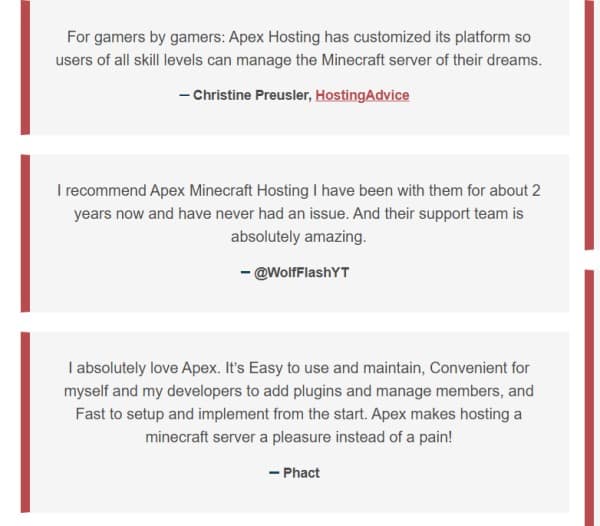
Apex Minecraft Hosting Testimonies From Real Users
The hosting platform has received many testimonials and positive reviews from its customers.

Jayson M claimed that the Apex Minecraft is affordable and reliable compared to other game hosting providers.
And there are more positive reviews and testimonies to prove that Apex stand out.
More Testimonials
Conclusion
There’s no denying that Apex Minecraft hosting is one of the best Minecraft hosting providers available today. It stands out because it solves the problems of Minecraft server hosting.
This includes the one-click Apex hosting Modpacks installer, the safelist safety protocol, a comprehensive control panel and more.
In general, this is undoubtedly a top-notch Minecraft server hosting provider. It has the highest recommendation, and thousands of testimonies from these customers support it.
FAQs About Apex Minecraft Hosting
Does Apex Hosting have lag?
A: No, Apex Hosting doesn’t have lag. This Minecraft hosting provider has explored all types of lag and found ways to minimise it.
Moreover, its website has a detailed guide that explains the different types and causes of lag and how to mitigate them.
Is Apex Hosting Free?
A: Unfortunately, Apex Hosting is not free. However, it does have affordable pricing packages starting from about $2 per month. It also offers a discount on all its packages for the first month’s payment.
However, remember that the more storage you want on your server, the more you pay.
Does Apex offer mod Minecraft hosting?
Yes, Apex offers mod Minecraft server hosting.
They offer many mods and Modpacks as part of their modded Minecraft hosting packages. Installation is easy, and they also provide helpful content and guides to help you through the process.
Is Apex Hosting good for ARK?
Apex hosting server is suitable for ARK; you can easily host your ARK Server without any issues.
Apex Hosting servers are easy to set up, and there is an exceptional support team to assist you.
How Do I Restore a Minecraft World on Apex?
A: Restoring a previous Minecraft world is easy. Here’s a brief step-by-step guide.
- Step 1: Go to the game panel and stop your server.
- Step 2: You’ll find the “backup” tab on the left side of the panel. Click on it
- Step 3: On the “backup” tab, you will find the zip files with the previously backed-up Minecraft world
- Step 4: Select the one you want to restore and click the “restore” tab
- Step 5: Go back to the main page of the game panel and open the console tab. Then, wait until the message” Done, returned okay” is displayed on the console page. Then, start the server again.
If you have any questions about the Apex Hosting review, kindly let me know through your comments.
Related Posts
