
LearnWorlds pricing starts at $29 per month for the base tier, with discounts for annual billing.
Below is the Learnworlds Pricing Breakdown:
Starter Plan: Costs $29 per month (or $24 per month when billed annually at $288/yr). It includes 1 admin, 1,000 active learners per month, and 300 AI credits per month.
Pro Trainer Plan: Costs $99 per month (or $79 per month when billed annually at $948/yr). It includes 5 admins, 2,000 active learners per month, and 500 AI credits per month.
Learning Center Plan: Costs $299 per month (or $249 per month when billed annually at $2,988/yr). It includes 25 admins, 2,000 active learners per month, and 1,000 AI credits per month
Corporate Plan: Custom offer; requires contacting support.
How Much Does LearnWorlds Cost?
| LearnWorlds Plan | Monthly | Yearly |
|---|---|---|
| Starter | $29/month + $5 per sale | $24/month (288/yr) + $5 per sale |
| Pro Trainer | $99/month | $74/month (948/yr) |
| Learning Center | $299/month | $249/month, (2,988/yr) |
| High Volume & Corporate | On request | On request via support |
LearnWorlds offers FOUR main pricing plans and is available for monthly and yearly payments.
When we compare both, the yearly plan is cost-effective, as you can save up to 20%.
If you’re just starting, we recommend you start with a monthly plan; you can test all its features and then upgrade to an annual plan.
The good news about LearnWorlds’ pricing plans is that they offer a 30-day free trial. The free trial is enough to check all the features.
Most of its plans come with some limitations, and I explained them below.
How Does LearnWorlds’ Pricing Compare?

The LearnWorlds pricing plans are based on the features included in each plan.
Your preferred plan may depend on the features available. Now, let’s compare all the LearnWorlds pricing plans.
Free Trial
The LearnWorlds free trial is 30 days with full access to all the features.
If you’re unsure where to start, join the free trial to familiarize yourself with the LearnWorlds platform.
Starter Plan: $29/month
The starter plan is LearnWorlds’ entry plan and offers all the essential tools to create and sell online courses.
The features included in the starter plan are:
- Unlimited paid courses
- 3-page website
- Payment integration
- 1-admin
- Marketing tools integration
- 24/7 support
With the starter plan, you can create basic courses and add a custom domain to create a website.
It allows three payment gateways to sell your course; however, the plan comes with some limitations that you must know about.
Limitation
While the starter plan looks amazing with a low price tag, it has many limitations that can affect your growth.
$5 per transaction: Despite its feature limitations, users still need to pay $5 for every transaction.
No interactive video with AI: This is a great disadvantage; you will need to do more manual work.
No AI subtitles and translation: You won’t be able to translate your courses into different languages.
No live sessions, webinar software (Zoom, Meet, Teams, or Webex). This limits your success in selling online courses if you depend on hosting webinars to promote your offers.
No landing pages: You will need third-party software to design your page to sell your course.
No reporting and analytics: You won’t be able to track your results.
No integration features. You can’t integrate with other tools to improve your workflow.
If you’re serious about selling an online course, this starter plan won’t help you go anywhere.
The starter plan is limited in features, and you can only consider it when you’re on a tight budget.
- Monthly: $29 per month
- Yearly: $24 per month
Pro Trainer: $99/month
The second plan is Pro Trainer, which comes with advanced features for coaches, course creators, and professionals to build and scale their online courses.
- It removes transaction fees, unlike the starter plan.
- It allows you to create unlimited courses, both free and paid.
- Here are the features that come with Pro Trainer.
- Live classes and webinars
- Unlimited website builder
- 5 admins
- Funnels
- Affiliate marketing
- Access to more integrations
- Access to SCORMs
- Email support 24/7
- And much more.
The Pro Trainer plan may be the best choice if you want all the advanced features for your online school.
- Monthly: $99/month
- Yearly: $79/month
The Pro Trainer may seem high, but it offers everything to increase engagement, expand your school, and grow your revenue.
Pro Trainer Limitation
Like the starter plan that comes with many disadvantages, Pro Trainer also has some limitations.
It comes with only 2,000 active members per month: if you create more than one online course and the number of students grows beyond 2,000, you’ll need to upgrade to the next plan.
Only 500 AI credits per month: If you depend more on AI, then you may quickly reach the limit, and to get more credit, you require an upgrade to the Learner Center, which costs $299 per month.
Only comes with 15 funnel pages with AI: If you have a team and are creating more courses, you’ll need to change to a higher plan to increase your limit.
Learning Center Plan: $299/month
This is the most popular LearnWorlds pricing plan. The plan suits big teams, groups, and institutions that need more advanced features for their online school.
The pricing plan:
- Monthly: $299 per month
- Yearly: $249/month, which costs $2988
This plan is created to boost your learning experience with the following features.
- Interactive videos
- Auto-transcript and titles
- White labelling options
- Multiple accounts with Zoom, etc.
- Cross-school clone
- Automation
- Custom user roles
- API and webhook
- Personal onboarding
- Mobile App
- And more
All The LearnWorlds Features For Creators
Below are the features you can find in the LearnWorlds platform. As you can see, they offer more advanced features for both beginners and professionals.

While many platforms to sell online courses provide amazing features, it may not be comparable to what LearnWorlds offers its users.
The downside is that not all features are available in all plans. The features you get depend on the pricing plan you choose.
Which LearnWorlds plans fit your business?
When planning to host your course with LearnWorlds and wanting to decide on the plan, it is crucial to consider some of these factors, such as:
- Features
- Limitations
- Value for money
Each of the LearnWorlds pricing plans meets the needs of the course creators.
Try LearnWorlds For 30-Day Free
Is LearnWorlds Expensive?
LearnWorlds seems priced compared to other popular online course platforms in the market.
When comparing LearnWorlds with Thinkific, Thinkific offers unlimited students on its plan.
The Thinkific basic plan costs $49 per month, and the second plan costs $199. Although it doesn’t charge transaction fees, it comes with a higher price when compared with the LearnWorlds Learning Center plan.
So, when we look at the LearnWorlds pricing plan, it is still affordable compared to other competitors like Thinkific and Teachable.
Now that you’re familiar with the LearnWorlds pricing plan and have decided on which plan to choose for your online course, how do you get started?
Which LearnWorlds Plan Should You Choose?
Selecting the right LearnWorlds plan depends on your goals, your audience, and how you plan to sell your course online.
All plans come with features to create and sell online courses, but higher plans come with advanced features to scale your business.
Choose the Starter Plan if You Are a Beginner
The Starter Plan is best for new creators who just want to test their ideas.
The downside is the transaction fees of $5 per sale.
It comes with a website builder, online course creation, and basic marketing tools
Choose Pro Trainer Plan To Scale Your Course Business
The Pro plan is the most popular and comes with advanced features for professional creators to build, grow, and scale their online course businesses.
It removes transaction fees and is great if you plan to sell membership sites.
LearnWorlds Learning Center Plan
This plan is designed for educators and professionals who need an advanced learning platform.
It is perfect for running a training program and comes with advanced analytics, reporting, and enterprise-level features that help businesses deliver training programs.
It is the only plan that comes with AI features such as generating subtitles, videos, audio, etc.
Hidden Costs and Fees
While the LearnWorlds price is straightforward, there are a few additional costs you need to know before choosing a plan.
Some additional fees are associated with LearnWorlds.
Transaction Fees on the Starter Plan: The starter plan includes a $5 per transaction fee for every course you create.
This fee is charged by the LearnWorlds platform and is separate from payment gateway fees.
For example, if you sell a course for $100, LearnWorlds takes $5 per sale.
Understand that a payment gateway like Stripe or PayPal will deduct their fees.
Many course creators upgrade to the Pro Trainer plan, which removes the transaction fee.
Payment Gateway Processing Fees: Another fee to pay is the payment gateway fees.
LearnWorlds processes payments through Stripe or PayPal, but they still charge their own processing fees.
The payment processing fees may be:
Stripe: 2.9% + $0.30 per transaction
PayPal: 2.49% plus a fixed fee based on the country
These charges apply to any LearnWorlds pricing plan you choose.
Mobile App Add-On
If you want to integrate a mobile app for your online school, it is an optional add-on that costs $149 per month.
The mobile app allows your students to access your courses through iOS and Android apps with your brand.
AI Credits Usage
AI content generation and video subtitle features come with usage limits. If you exceed your limits, you will need to buy additional credits.
Taxes and VAT
You need to pay taxes and VAT depending on your country or region.
The pricing of LearnWorlds is transparent, but the transaction fee for the starter plan, payment processing fees, and add-ons can increase your monthly expenses.
How To Get Started With LearnWorlds
Here are some steps to start your journey with the LearnWorlds online course platform.
Start a 30-day free trial.
Step 1: Create a LearnWorlds account

To create your account, head to Learnworlds’ official website and click on Get Started for Free.
Add your email address and your school URL. You can also sign up with a Google account.
Step 2: Manage Account

Go to “My account” to create a new LearnWorlds school. You can also play around with the dashboards to understand how it works.
You can view your account and billing section.
Step 3: LearnWorlds School Dashboard
When creating an account, an organization is designed as the default. As an organization owner, you can create one or more schools.
When you log in to LearnWorlds, you will see the organization owner dashboard, where you can
Create and manage LearnWorlds schools. You can also clone an existing school to make your work easier.
Step 4: Dashboard

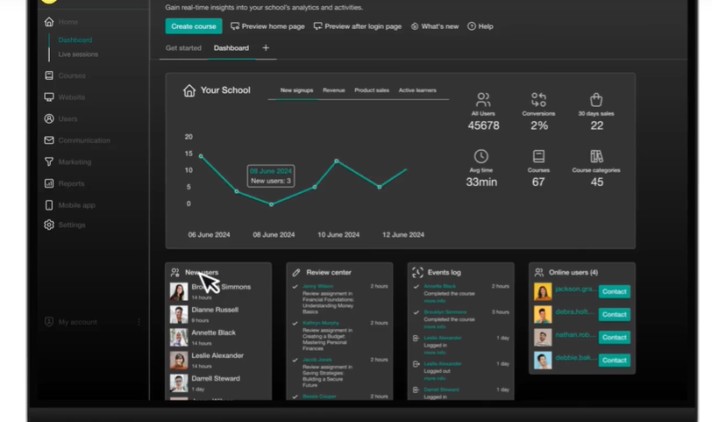
After creating your school through the organization, you can then access the school dashboard to view all the events, such as insights, revenue, product sales, and the number of students.
Step 5: Theme Explorer Settings

This is where you configure page colour, layout, buttons, typography,, etc.
Go to website> Theme Explorer> design> edit Theme Explorer.
Step 6: Create Pages
This is where you can create pages and customize them to fit your brand.
From the website> Design> Edit School Site. You can create a new page or edit the existing one.
Step 7: Add Payment Gateways
To receive payment for your online course, you must connect your account with a payment gateway of your choice.
From settings > Financial > payment gateways. Select and connect the payment gateway you prefer to use.
Step 7: Course Creation
Once you have set up your pages and added a payment gateway, it is time to start creating your courses.
You can create courses in just three steps:
- Create Course
- Organise the course sections
- Add activities
Final Thoughts On LearnWorlds Pricing
We have explained all the LearnWorlds plans and their prices. Most suitable one for your business depends on the features you need.
If you have a limited budget and just want to create an online course with little customization, then you can start with the LearnWorlds starter plan.
And if you want to create a complete online course using marketing and advanced features, go with the Pro Starter plan.
You can’t go wrong with the Learning Center Plan if you need the white-label feature and interactive videos.
We hope this article helps you to choose the right LearnWorlds pricing plan that suits your business needs.
FAQ
Does LearnWorlds offer a free trial?
Yes, LearnWorlds offers a 30-day free trial without a credit card. This offer allows you to test all its features and decide if it is worth it.
Do I need to add my credit card for a free trial?
You don’t need to add your credit card during the free trial. You only need to create an account and start launching your online course.
Does LearnWorlds have transaction fees?
Only the LearnWorlds starter plan has transaction fees; other plans, such as Pro Starter and Learning Centre, have no transaction fees.
LearnWorlds Alternatives To Consider
If you think LearnWorlds’ cost is an issue for a better alternative, then we will get you covered.
There are many other online course platforms besides LearnWorlds you may want to check.
LearnWorlds vs. ClickFunnels
Clickfunnels: It is well-known for all-in-one marketing software with various features to help start and grow your business online.
With ClickFunnels, you can create an online course, build membership sites, sales funnels for digital products, and landing pages.
When comparing the ClickFunnels price with the LearnWorlds platform. The startup plan costs $97 monthly, and Pro costs $297.
LearnWorlds vs. Systeme.io
Systeme platform.: Another platform you may want to check as a better alternative to LearnWorlds is Systeme.io. Prices start from $29 to $97 per month.
If you have a question about the LearnWorlds monthly subscription plans, kindly let us know in the comments section.
LearnWorlds Vs Kajabi
Another good alternative is Kajabi. It is an online course platform with many features for course creators to sell courses online.
Kajabi is more expensive than LearnWorlds, but it also offers value for your money. LearnWorlds offers a better learning experience, and you can start as low as $29 per month.
LearnWorlds Vs. PayKickstart
PayKickStart is another platform to sell online courses, digital products, SaaS software, etc. If you’re looking for an all-in-one platform for all your online businesses, you can check out Paykickstart software.
Related Posts
- Thinkific Free Trial
- GetResponse Review
- How to Make Money with ChatGPT
- 6 Best Shopify Referral Apps
- 7 Best Screenwriting Software Review
